2014年10月1日星期三

A Handy Method of Accessing json Data in Java

It is possible that json data is needed to be processed in Java projects. Here we'll introduce a handy method of accessing data of json files through an example. Ajson file, test.json, contains information of class, serial numbers, names, subjects and scores,etc. In this example, data will be imported, sorted by scores in descending order and written to the file test_result.json. The format of test.json is as follows:
[
    {
        "class": "Class one",
        "id": 7,
        "name": "Nicholas",
        "subject": "PE",
        "score": 60
    },
{
        "class": "Class one",
        "id": 1,
        "name": "Emily",
        "subject": "English",
        "score": 84
},
    ......

    {
        "class": "Class one",
        "id": 1,
        "name": "Emily",
        "subject": "Math",
        "score": 77
}
]

The open source project json-lib is needed to be imported into Java. To do this, the necessary packages include:
         json-lib-2.4-jdk15.jar
         ezmorph-1.0.6.jar
         commons-lang.jar
         commons-beanutils.jar
         commons-logging.jar
         commons-collections.jar

With the json-lib available, way of coding will be like this:

1. Import data from the file, parse them into jsonArr, the json object, using json-lib's JSONArray.

2. Sort the values of "score" of jObject, representing all members of jsonArr object, in descending order using comparison sort algorithm.


3.  Write the sortedjsonArr to the file.


The code is as follows:     public static void myJson() throws Exception{
           //then import data from the file
           File file = new File("D:/file/test.json");
           FileInputStreamfis = null;
           fis = new FileInputStream(file);
           InputStreamReader input = new InputStreamReader(fis);
           BufferedReader reader = new BufferedReader(input);
           String laststr = "";
    String tempString = null;
while ((tempString = reader.readLine()) != null) {
                   laststr = laststr+ tempString;
    }
reader.close();
    //then parse the imported data into json object
JSONArrayjsonArr = JSONArray.fromObject(laststr );
    //then sort the json data (in descending order)
JSONObjectjObject = null;
           for(inti = 0;i<jsonArr.size();i++){
                    long l = Long.parseLong(jsonArr.getJSONObject(i).get("score").toString());
                    for(int j = i+1; j<jsonArr.size();j++){
                                       longnl = Long.parseLong(jsonArr.getJSONObject(j).get("score").toString());
                                       if(l<nl){
                                                jObject = jsonArr.getJSONObject(j);
                                                jsonArr.set(j, jsonArr.getJSONObject(i));
                                                jsonArr.set(i, jObject);
                                       }
                    }
           }
           //then write the result to the file
FileOutputStream out = new FileOutputStream("D:/file/test_result.json");
out.write(jsonArr.toString().getBytes());
out.close();
}

myJson function has been able to access and sort json data, but it lacks some universality. When sorting in ascending order or by several fields is required, program has to be modified. But if we want to make the function perform more universal and flexible sorting as SQL does, analysis of dynamic expressions will be required, which will result in quite complicated code.

esProc can help Java with accessing and processing json data. It has the advantage of creating dynamic sorting expressions using simple code. It can deal with tasks about jsondata, like importing, accessing, computing and writing to the file, conveniently. In order to perform dynamic sorting, a sorting expression can be transferred to esProc as a parameter as follows: 

The value of parameter sortBy is score:-1. Only 5 lines of code are needed to develop a program of sorting json data in esProc. Please see below: 

A1Use read() to load data from the json file in the format of strings. (esProc's developing tool can display the computed result visually, as shown in the left part of the above figure).

A2Parse json data into a table sequence using the import@j() method.

A3Sort the data; then esProc will first compute the parameter sortBy in macro ${sortBy}. After that, the statement to be executed is A2.sort(score:-1), meaning sorting by score in descending order.

A4Parse the sorting result into strings of json format.

A5:Output the stings to the file.

If the fields for and way of sorting are changed, what we need is to modify parameter sortBy instead of the program. For instance, sort by id in descending order and by score in ascending order. We may just modify sortBy into id:-1,score:1. The statement of sorting we finally execute is A2.sort(id:-1,score:1), and the result is as follows: 
This piece of esProc code can be called conveniently in Java using jdbc provided by esProc. To save the above esProc program as test.dfx file, Java will call the following code:
          //create a connection between esProc and jdbc
Class.forName("com.esproc.jdbc.InternalDriver");
con= DriverManager.getConnection("jdbc:esproc:local://");
//call esProc program (the stored procedure), in which test is the file name of dfx
com.esproc.jdbc.InternalCStatementst;
st =(com.esproc.jdbc.InternalCStatement)con.prepareCall("call test(?)");
// set parameters
st.setObject(1,"id:-1,score:1");//esProc’s input parameters
// execute the esProc stored procedure
st.execute();

Here the relatively simple esProc code can be called directly in Java, so it is unnecessary to write esProc script file (like the above-mentioned test.dfx). See the following for detailed code:
st=(com. esproc.jdbc.InternalCStatement)con.createStatement();
st.executeQuery(">file(\"d:/file/test_result.json\").write(export@j(file(\"d:/file/test.json\").read().import@j().sort(score:-1)))");


The above Java code calls directly a line of esProc code, that is, import data from the text file, sort them according to specified fields and write the result to the file. 

2014年9月30日星期二

Merge and Join Cursors in Proper Order in esProc

1.     Merge in proper order

Many a time, data could be stored in several data tables, for example, product sales records of several categories, and employee profiles of each department. In this case, we need to merge the data from multiple data tables for combined use. For the several normal homogeneous TSeqs, you can use A.conj() or A.merge(x) to merge the records of each TSeq into RSeq for use. If the big data is used in the data table, then you can also use CS.conj@x() and CS.merge@x(x) to combine the data in each cursor of cursor sequence CS, and merge and read them out when retrieving.

The data in cursor can only be traversed once, so it is impossible to sort over again after merging and retrieving all data from cursor. In view of this, the data in each cursor must be ordered in case of merging the data from multiple cursors.

Next, let's learn about the usage and difference between CS.conj@x() and CS.merge@x(x). Firstly, let’s have a look at situation about the simple union.

Four pieces of text data are respectively used to record the order information about wines, electrical appliances, foods, and books. In A6, the data in the four pieces of text data cursor will be united. To find out the order in which the data are retrieved, the following code retrieves 300 records each time, and suspends data retrieval once the retrieved data contains records of goods of different categories. In this case, the retrieved TSeq can be seen in B7 as follows:


As can be learned from the result, regarding the union cursor, after all wine order data are retrieved from the 1st text data table, start to retrieve the electrical appliance data from the 2nd text data table. In other words, after the simple union by using CS.conj@x() function, the records in the resulting cursor will be retrieved in the same order as each cursor is arranged in the cursor sequence CS.

In most cases, we are not just required to union the records from each data table one after another. Instead, we want to merge them in proper order. To serve this purpose, the CS.merge@x(x) function can be used. Please note that the records in each cursor of the cursor sequence CS must be ordered for the expression x when using this function. For example, sort and merge the data of orders placed for products in each category by the sales date:

In this case, we intend to have a clear view of the order in which the records are retrieved from cursor after merging in proper order. To server this purpose, only the first 300 entries are retrieved. The TSeq in B7 is shown below:

As can be seen, the data are retrieved in a specified order of Date. Once all wine order data of January 1stis retrieved, retrieving all electrical appliance order data of the January 1st will start. Because retrieving data with cursor is a forward-only operation that can only be performed from the first to the last, the order data in each cursor must be ordered by date. After using function CS.merge@x() to merge in proper order, by comparing the current computation expression value on each data table, the result cursor will choose from the cursors of sequence CS to retrieve data when retrieving records. In this way, we can ultimately get the result arranged in the specified order. In data retrieving, each cursor will still traverse the records in each data table for once.

When merging the data in multiple cursors in proper order, the multiple cursors are simply merged into one, and the orders in which to retrieve data in each cursor has adjusted, without increasing or decreasing any record data.

If the data in cursor is not ordered, the data in cursor must be sorted before merging, as illustrated in the below example:
Before the data in cursor is merged in proper order by the product sequence number, you must ensure the data in each cursor is ordered for the product sequence number. To do so, in A5, use function cs.sortx() to complete the sorting.

Please note that the cursor and TSeq are sorted differently. Because there are usually great amount of data in the cursor, they cannot be loaded into the memory all at once for sorting. Therefore, the data retrieving is performed along with the data sorting. The data will be saved as temporary data files when they are accumulated to a certain amount. Once all data are retrieved and sorted, all temporary data files will be merged in proper order, and return as the result cursor.

In B7, the retrieved records are shown below:
As can be seen, the ordered merging can be accomplished once the data in each cursor have been sorted.

2.Aligned joining

When making the statistics, sometimes, you need to consolidate the data from multiple cursors, which is similar to joining the data from multiple tables. If the data in cursor are required to join a normal TSeq, then you can use cs.switch().

What if the data to join are all from the cursor? As we know, it is usually impossible to retrieve all data in the cursor. How can we join these data then? In esProc, you can use function join@x() to join the data from multiple cursors. For example:

In A5~A8, perform the aggregate operations over the products in each category, and return the respective cursor of temporary files. In A9, the daily sales data for products in each category will be aligned and joined by date. From A10, retrieve the statistical results of the first 25 days, as shown below:
Once the cursor is aligned joined, a cursor will be returned. From which the retrieved result is similar to the TSeq joining, and all fields are composed of the records. Thus, when retrieving, you must note that the joined records take more memory than those in the normal cases. In addition, since data is composed of records while not values, please note the requirements on writing the expression, in particular the re-joining with the result cursor, when using the result cursor for computation.

The result of aligned joining of cursors can also be used to inherit such as filtering or generating, for example:

From the joined cursor, filter out the total amount of food orders which are greater than the total amount of wine orders, and then generate the TSeq. In A12, return the first 100 rows of results:

In using the aligned joining with cursor, you must remember that the data in the cursor cannot be read into and maintain in the memory during retrieving the data. Instead, they can only be traversed for once from the first to the last. Therefore, regarding the join operation, the data in each cursor must be sorted, which is different from processing the multi-table join for database, and quite unlike the join() for normal TSeq. As shown in the above example, the data in A5~A8 are ordered by date, which can ensure the computation is correct when joining.

In order to explain this problem, we create a cursor using two in-memory TSeq. Let’s have a look:

The TSeqs in A1and A2 are shown below:

In A5, you will see the aligned joining result:

The data in cursor is different to the normal TSeq. When looking for the New York state corresponding to the New York city for joining, the cursor of State data has already moved to the entry 32, and the previous records are unfindable for later computations. So, for most cities, the corresponding state is unfindable like this. Because the option @1 and @a are not used in function join@x() to specify the left join or full join, only cities finding out corresponding state are returned, and the data are quite few.

If having the city information sorted first, then you can have the normal result of joining:

In A1, the data are sorted by STATEID:

In A6, you will see the joining result:

2014年9月29日星期一

Aggregate Operations over Cursor in esProc

The data volume of big data table is usually quite huge, which makes it impossible to retrieve all data in the big data table. In view of this, the data processing over big data table is usually to serve two purposes: With cs.fetch(), retrieve partial data each time or group & aggregate the data in the big data table.

1. Grouping and aggregate operations over cursor

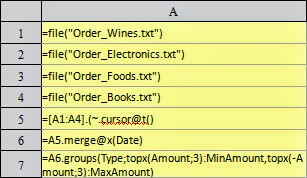
The commonest grouping & aggregate operations are counting and summation. In addition, the aggregate operation also includes seeking the maximum, minimum, and top n data. For the data aggregating operation in the cursor, you can use function cs.groups(), the aggregate functions corresponding to various aggregate operations are respectively the count/sum/max/min/topx, for example:

In A7, make statistics on the total number of orders, maximum tradeamount, and total amount for products in each category. One thing to note is that the precision of the double-precision data is usually not enough. In this case, decimal() is required to convert the data to the big decimal type of computing. Regarding the grouping and aggregate computation over cursors, all data will be traversed for once. During traversing, the data in each row will be aggregated in its corresponding group. Multiple aggregate values can be computed in one traversal, and the cursor will be closed automatically once the traversal is completed.

The result in A7 is as follows: 
As can be seen, in the adopted text data for test, each category has 50,000 records for orders. From the above example, you may find that the data in the cursor A6 is ordered by Date, but not ordered by the field Type. So, when using function cs.groups() to group and summarize, there is no need to have the data in the cursor sorted. After grouping and aggregating, result will be sorted by the grouping value. In addition, because the function cs.groups() returns a TSeq, the result set must not exceed the memory size when using this function to handle the grouping and aggregating. It is not fit for the big data result set.

For the aggregate operations, you can make statistics on the n greatest/smallest data. In this case, the aggregate function is topx: 

In A7, according to the computation of products of each category, the 3 orders with the lowest total prices and the other 3 orders with the highest total price can be found. Please remember to add the negative sign to the aggregate function when computing the 3 orders with the highest total price, that is, topx(-Amount:3). The result is as follows: 

To aggregate all records, simply leave the grouping expression of function cs.groups blank: 

The result in A7 is as follows: 
This shows that the aggregating result for all records can be regarded as a special grouping and aggregating.

2. Aggregate operations over multiple cursors

When handling the aggregate operations over multiple cursors, you can compute the result of each aggregate computation over cursor first: 

In A6, group and aggregate over each file cursor respectively, and compute the daily aggregated statistics on the product data of each category: 

Because the data will be sorted by group value when using the cs.groups() function to aggregate and group over the cursor, the resulting TSeq after aggregating is ordered for the Date, no matter the original data is in whatever order for each category of product. So, the result can be merged further to compute the daily order data for all products: 

In A8, you will see the computation result: 
Since the orders for products of each category have been sorted by date in each data file, the cursor can be merged, and then aggregated:

As you can see, this method leads to the same results given above. For the cursor that is ordered for multiple pieces of data, it would be more simple and effective to merge first, then group and aggregate. One thing to note is the difference between merge and merge@x:A.merge() is to merge the members of several sequences or records of several TSeq in proper order, and return a Sequence. The computation is completed during the operation; CS.merge@x() is to merge the records from multiple cursors in proper order, return a cursor, and start the real computing when fetching data from cursor. During this procedure, the data in A and CS must be ordered.

3.Big data result set

In the above section, we've learned that the data of each part can be grouped and aggregated respectively first to have a group of ordered result TSeq, then merge the result to get the final result of overall grouping and aggregating. With such method, we can solve the grouping and aggregating problems related to the big data result set.

The big data result set not only refers to the source data for computation is of huge amount, but also the computing result. Owing to this, the computing result cannot be read into the memory all at once. They have to be read out step by step. For example, the telecommunication company makes statistics on the monthly bill for each user; The B2C website collects the statistics on the sales of each product. The statistical results based on these data may contain more than several millions of records.

In esProc, you can use function cs.groupx() to perform the grouping and aggregate operations over the big data result set. Here, we will take the daily statistics on product orders to illustrate the usage of big data result set. In order to have a practical experience about the memory limit, we require only 100 pieces of records be retrieved each time. Then, if we need to compute the everyday order by grouping and aggregating, we must use the function groupx: 

In A6, the data in each cursor can be joined one by one, instead of just being sorted by date. In A7, after the grouping and aggregating, a cursor instead of a TSeq will be returned. By doing so, the data can be retrieved step by step in A8~A11. The data are shown below: 

In which, each of A8~A10 will retrieve the statistical result for the 100days, and A11 will retrieve the remaining data.

In A7, with the function groupx, the data are grouped and aggregated by date, and the number of buffered rows is set to 100. By doing so, when executed in A7, the data from cursor A6 is retrieved along with the splitting and aggregating. Each time, when the 100 rows of aggregating results come into being, they will be buffered to a temporary file, and the rest can be done in the same manner. The computing result in A7 is the file group cursor composed of these temporary files: 

To execute step by step, you can view the generated temporary file in the system temporary directory once executed in A7: 

In order to understand the contents of these binary files more clearly, you can retrieve the data from these files, for example: 

The data in A1 and A3 are shown below: 

The name of temporary file is generated randomly. Judging from the data retrieved from some temporary files, it can be seen that results of grouping and aggregating some consecutive original records are stored in each temporary file, and they are already sorted by the date. In fact, based on the number of buffered rows in the function expression, each temporary file, except for the last one, contains partial summary data for just 100 dates. If using groupx to generate a cursor, and retrieving data with this cursor fetch, the data of all temporary files will be merged in proper order.

After data are retrieved with the cursor of temporary files or the cursor is closed, the related temporary files will be deleted automatically.

2014年9月28日星期日

An Illustration of Processing Big Text Files with esProc Cursor

esProc can process big text files conveniently by providing cursor data object. The following example is to illustrate this.

Let's assume that there is a text file, sales.txt, with ten million sales records. Its main fields include SellerID, OrderDate and Amount. Now compute each salesman's total Amount of big orders in the past four years. The big orders refer to those whose amount is above 2000.

esProc code:

Code interpretation:
A1: If all the ten million records are read into memory simultaneously, memory will overflow. So the job will be done in batches.

A2: Read by looping, 100,000 rows at a time.

B3: Filter each batch of data, select those records whose amount is above 2000 after the year of 2011.

B4: Group and summarize the filtered data, seek the sales of each salesperson in this batch of data.

B5: Add the computed result of this batch of data to a certain variable (B1), and move on to the computation of next batch of data.

B6: After all the computations, sales of each salesperson in every batch of data will be found in B1. Last, group and summarize these sales data and seek each salesperson's total sales amount.

Analysis:In cell A1, esProc cursor is created with function cursor. The cell name is the cursor’s variable name. When the cursor is created, data will not be read in the memory directly. Read-in will only be executed while fetch operation or other equal operations are going on, e.g., the code for A1,100000 in cell A2 represents reading data from cursor by looping with 100,000 rows at a time. We can see that the data size in memory is always kept in a relatively small level and no overflows will occur.

select and groups are computation functions specially used with structured data. After the data is read in the memory with esProc cursor, they can be processed and analyzed by employing functions of professional structured data computation library. This is more convenient than writing underlying code by hand.  

Equipped with functions and grammar of semi-structured data processing, e.g., function for data split and merging, looping and traversal statement and branch judgment statement, esProc cursor can do complex task of data cleansing and arrangement and form easily computed structured data.   

Splitting and analyzing
For instance, the format of weblog is too complex to be computed and analyzed directly. A typical web blog text need to be transformed into a two-dimensional table of standard format in order to be used in structured data computation or be stored in a database.  

A record in the original weblog:
10.10.10.145 - - [01/May/2013:03:24:56 -0400] "GET /product/p0040001/review.jsp?page=5 HTTP/1.1" 200 8100 "http://www.xxx.com/xxxx.html""Mozilla/5.0 (Windows NT 6.1) AppleWebKit/537.36 (KHTML, like Gecko) Chrome/29.0.1547.66 Safari/537.36" 0 tankLee in 9fc0792eb272b78916c3872e9ad –

The records in a two-dimensional table are:

The following case omits the process of file accesses and the final merging of multiple batches of data(refer to the previous example), and lists the code for splitting and analyzing directly.

Data cleansing
Let's see a typical example of data cleansing. Since the employee table read in from a file is not a standard format, it need to be reorganized into standard structural data in batches. Data of the current batch will be stored in cell D3 temporarily. The rule for reorganizing is:

1. The record is invalid if UserID and firstName is null or blank string.

2. UserID can only contain digits; the record is invalid if letters appear in it.

3. For repeated UserID, only the last entered record is kept.

4. Delete possible spacing before and after the data.

5. Capitalize all the first letters of firstName.

6. Full name is combined in the form of firstName+"."+"lastName". But, if lastName is null or blank string, fullname equals to firstName.

The following table also omits the process of file accesses and the merging of multiple batches of data, and only lists the code for data cleansing:

2014年9月25日星期四

Group Cursor in esProc

In the big data computing, besides the grouping and aggregate operations, sometimes you also need to retrieve a group of data each time to analyze. For example, analyze the sales by date, collect statistics on sales curve for each product, and the purchase habit of each client.

In esProc, you can use function cs.fetch(;x) or cs.skip(;x) to get or skip records till the value of expression x is changed. By doing so, a group of consecutive data can be obtained. For example, retrieve a product each time and prepare to examine the sales data of each product:

From B7, the records of the 20th goods can be retrieved like this: 

The data retrieval in esProc cursor is a one-way street. Thus the data in cursor must be in order when retrieving a group of records each time as necessary.

As we know, that the @z option can be used to retrieve file by block or data from cursor. However, when retrieving by block, esProc will determine how the data is divided, and sometimes you may encounter troubles.

First, let's prepare a data text: For the above-used data which are already sorted by the sequence number, store them into a new binary file Order_Products: 

In the later computation, if retrieving data by segment, we will get the situation given below: 

After all data are divided into 100 segments, retrieve the data from the 1st segment in A3, and retrieve the data from 2nd segment in A5, as shown below: 

At this point, you may encounter such problems: For the product number B1445, its sales record appears in both groups. If aggregating after data retrieval each time, then duplicate product numbers may appear in the result returned, and the re-aggregation will be necessary to get the final result. Such piecewise computation is quite common for the parallel computation over big data. The above conditions will make the computation ever more complicated. In this case, we should perform the segmenting by group when storing the data.

When storing the binary data with the cursor, simply use the @g option. In this case, the data written into the cursor will be segmented by group. By doing so, the data from a same group is sure to be fully retrieved all at once when retrieving the data by block. For example: 

For the data sorted by the sequence number of products, save them as a binary file Order_Products_G, segment by group according to the PID. This is slightly different to the method we adopted previously to write the data to a file of Order_Products. Please note that piecewise storage is only valid for the binary file.

To this point, the circumstances are different to retrieve by section: 

In this step, the data retrieved in A3 and A5 are as follows: 

At this point, for the data of the segment 1, all product records whose number is B1445 will be read out. As for the data of segment 2, the record will be retrieved from the next product. As can be seen, if the segmenting by group is set to perform during writing a binary file, the data of a whole group will be put in a segment for retrieval from the cursor. With segmenting by group, the integrity of the data in each group can be guaranteed, and the piecewise computation over big data can be simpler and easier.